macOS 27 Ships an On-Device LLM CLI Called fm
macOS 27 ships fm, a command-line tool for Apple’s on-device Foundation Model.
It’s the model at the core of Apple Intelligence, previously only accessible to
apps through Swift, and now it reads stdin. There’s no account or API key, and
nothing leaves the machine, which changes what you can reasonably put in a shell
pipeline. I spent a morning playing around with it to see what it’s good for.
tl;dr it’s a very good JSON extractor and a poor encyclopaedia, and the local server it ships with is mostly, but not entirely, OpenAI-compatible.
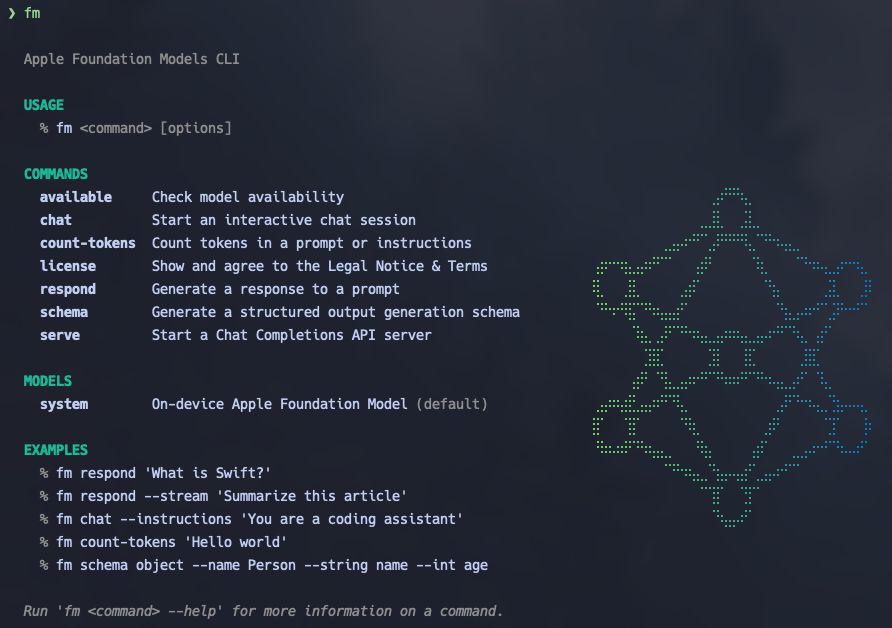
Typing fm on its own gets you this:
The first real command makes you agree to a licence. It’s machine-wide, so it
wants sudo fm license. After that it behaves like any other filter:
$ tail -3 backup.log
2026-09-21 09:14:02 WARN  disk /dev/disk3 at 91%
2026-09-21 09:14:07 ERROR backup job nightly failed: rsync exit 23
2026-09-21 09:15:00 INFO  cron: nightly retry scheduled

$ tail -3 backup.log | fm respond -i 'One sentence: what needs attention?'
The disk /dev/disk3 is at 91% usage, and the nightly backup job failed with an rsync exit code of 23.
Good answer, the first time. Two more runs mentioned the disk and forgot the failed backup.
The instruction is in -i rather than a positional argument because a
positional prompt (or --text) makes fm respond ignore stdin. It exits 0 and
answers the prompt with nothing behind it:
$ echo 'The secret word is Pineapple.' | fm respond 'What is the secret word?'
The secret word is "apple."
With -i it says Pineapple.
Three to five seconds for that, depending on whether the model was already in memory. A one-word prompt takes 2.4 s cold. Call again within a few seconds and it’s still warm and takes 0.4 s; leave it six seconds and you’re back to 2.4. So a tight loop is fine, and anything with gaps pays two seconds a call.
The screenshot has the full command list, and fm <command> --help and man fm
are both good. Nearly everything below is respond, plus schema to build
schemas for it and serve to keep the model in memory behind an HTTP endpoint.
chat is a REPL with saved sessions, which I’ll skip.
One small model
There’s currently only one model, system. Apple’s WWDC session shows a
--model pcc option for the larger Private Cloud Compute model, but on 27.0
it’s rejected (Please provide one of 'system'), so I figure this is a future
feature? No temperature or max-tokens flags either, just -g for greedy
sampling.
It behaves like a small on-device model. It is good at tagging, summarising, rewriting, and pulling structured data out of text, and unreliable on facts. Everything you’d expect from a small model.
Image input works, though:
$ fm respond --image invoice.png --text 'What text is in this image? Reply with the text only.'
INVOICE 4821 due 2026-10-15
That’s exact, and so was a five-line receipt in 13 px monospace. There’s also a
--tool ocr flag that fm respond --help lists but the man page doesn’t. It
gave identical answers on both images, so I still can’t say what it adds over
plain --image.
Structured output
This is the aspect of the tool that I am most interested in. fm schema builds
a JSON schema from flags, --schema constrains the output to it, and the text
to work on comes in on stdin. Here it’s classifying a commit message:
$ fm schema object --name Commit \
    --string type \
    --string scope --optional \
    --boolean breaking \
    --string summary --description "One line, imperative mood" \
  | jq '.properties.type.enum = ["feat","fix","docs","refactor","chore"]' \
  > commit.schema.json

$ git log -1 --format=%B | fm respond --schema commit.schema.json \
    --instructions 'Classify the commit message.'
{"summary": "Generate thumbnails at build time using Hugo image processing;
 remove old thumb shortcode; use figure instead.", "breaking": false, "type": "feat"}
The jq step is there because fm schema does not appear to have an --enum
flag. Without it, --string type means “any string”, and the model invents a
category that sounds right:
Bump version to 2.3.0                    → "type": "version-bump"
Update dependencies                      → "type": "dependency update"
Add dark mode toggle to settings screen  → "type": "feature"
The schema format does appear to accept enum, and fm respond enforces it,
so jq adds the keyword the generator can’t. Same three commits with the enum
in place:
Bump version to 2.3.0                    → "type": "chore"
Update dependencies                      → "type": "chore"
Add dark mode toggle to settings screen  → "type": "feat"
A --description saying “One of: feat, fix, docs, refactor, chore” also works;
fifteen runs across five commits all stayed on the list, and I couldn’t talk the
model off it even when I tried. The difference is what’s backing the promise.
A description is a hint, and the model happened to follow it every time I
tried it. An enum goes through the framework’s guided generation, which
Apple documents as enforced by constrained decoding
(WWDC25 session 286,
around 5:20). I never actually saw them behave differently, but for a script
that switches on type I’d rather rely on an enforced guarantee than on a
habit that just hasn’t broken yet.
The local server
fm serve starts a Chat Completions endpoint. By default it listens on
127.0.0.1 only, so nothing off the machine can reach it:
$ fm serve --port 1976
Apple Foundation Models Serve
  url    http://127.0.0.1:1976
  access loopback-only

  · POST /v1/chat/completions
  · GET  /v1/models
  · GET  /health
Streaming is on by default
The OpenAI SDK works, but on 27.0 the server streams unless told
stream: false, and the SDK doesn’t send that field unless you set it. The
obvious code gets a stream of chunks back as a raw string and r.choices fails.
Pass stream=False:
from openai import OpenAI

client = OpenAI(base_url="http://127.0.0.1:1976/v1", api_key="unused")
r = client.chat.completions.create(
    model="system",
    stream=False,  # required; fm serve streams unless told otherwise
    messages=[{"role": "user", "content": "What is a Hugo page bundle?"}],
)
print(r.choices[0].message.content)
api_key is required by the SDK and ignored by the server. The model name has
to be system or you get a 400.
Other request fields
I tried the other request fields with curl. This one shows the token limit
working (using max_completion_tokens for the limit as the deprecated
max_tokens appears to be silently ignored):
$ curl -s localhost:1976/v1/chat/completions -H 'content-type: application/json' -d '{
    "model": "system", "stream": false, "max_completion_tokens": 20,
    "messages": [{"role": "user", "content": "Explain what a static site generator is."}]
  }' | jq '{text: .choices[0].message.content, usage: .usage.completion_tokens, finish: .choices[0].finish_reason}'
{
  "text": "A static site generator (SSG) is a software tool that takes input, typically in the form",
  "usage": 20,
  "finish": "stop"
}
Interestingly, tools is accepted and silently ignored. The request returns
200, but the reply is prose in content, never a tool_calls block, so
anything built on function calling won’t work against it:
$ curl -s localhost:1976/v1/chat/completions -H 'content-type: application/json' -d '{
    "model": "system", "stream": false,
    "messages": [{"role": "user", "content": "What is the weather in Hobart?"}],
    "tools": [{"type": "function", "function": {"name": "get_weather",
      "description": "Get weather for a city",
      "parameters": {"type": "object", "properties": {"city": {"type": "string"}}, "required": ["city"]}}}]
  }' | jq '{message: .choices[0].message, prompt_tokens: .usage.prompt_tokens}'
{
  "message": {
    "role": "assistant",
    "content": "[You need to call the tool to get the weather in Hobart]",
    "refusal": null
  },
  "prompt_tokens": 255
}
Pydantic models need one override
The SDK’s usual route to structured output, a Pydantic model passed to
parse(), fails:
from typing import Literal
from openai import OpenAI
from pydantic import BaseModel

class Commit(BaseModel):
    type: Literal["feat", "fix", "docs", "refactor", "chore"]
    breaking: bool
    summary: str

client = OpenAI(base_url="http://127.0.0.1:1976/v1", api_key="unused")
r = client.chat.completions.parse(
    model="system",
    response_format=Commit,
    messages=[{"role": "user", "content": "Classify: Remove deprecated thumb shortcode"}],
)
print(r.choices[0].message.parsed)
openai.BadRequestError: Error code: 400 - Invalid response_format schema:
Path: properties.summary.enum. Debug description: Named string types must have
a non-empty enum field
So, Pydantic puts a "title" on every property
("summary": {"title": "Summary", "type": "string"}), and fm treats a string
with a title as a named type that must also carry an enum. type has one, so
it passes, but summary doesn’t, so the schema is rejected. Instructor sends
the same schema and gets the same error.
The fix is to make the model generate its schema without titles. parse() calls
model_json_schema() to build the request, so overriding that on the model is
enough; the call itself doesn’t change:
from typing import Literal
from openai import OpenAI
from pydantic import BaseModel
from pydantic.json_schema import GenerateJsonSchema

class NoTitles(GenerateJsonSchema):
    def field_title_should_be_set(self, schema):
        return False

class Commit(BaseModel):
    type: Literal["feat", "fix", "docs", "refactor", "chore"]
    breaking: bool
    summary: str

    @classmethod
    def model_json_schema(cls, *args, **kwargs):
        kwargs.setdefault("schema_generator", NoTitles)
        return super().model_json_schema(*args, **kwargs)

client = OpenAI(base_url="http://127.0.0.1:1976/v1", api_key="unused")
r = client.chat.completions.parse(
    model="system",
    response_format=Commit,
    messages=[{"role": "user", "content": "Classify: Remove deprecated thumb shortcode"}],
)
print(r.choices[0].message.parsed)
type='fix' breaking=True summary='The `remove_deprecated_thumb_shortcode` shortcode has been deprecated. Please update your content to use the recommended alternative.'
Run either with fm serve --port 1976 in another terminal and
uv run --with openai --with pydantic python script.py.
It isn’t the fast path
I half-expected the server to be the fast path, assuming the server would keep
the weights in memory so each request pays only for inference. But that doesn’t
appear to be the case with fm. Model residency is managed by the system, not
by the fm serve process.
Because of this, the server and the one-shot fm respond command perform nearly
identically (usually within a tenth of a second of each other). If you wait just
15 to 60 seconds between requests, the execution takes about 2.2 seconds.
Immediate follow-up requests drop to about 0.5 seconds. You can easily track
these warm and cold speeds via the per-request logs.
Since fm serve doesn’t offer a speed advantage, I suspect I would only run the server when:
- I need an HTTP endpoint.
- My client tool expects an OpenAI-compatible API.
- I am calling the model from a language other than shell.
What I may use it for
The first thing to come to mind is metadata for this blog. I always forget to
add the ruddy description and tags fields, and on the odd occasion when I do
remember, usually draw a blank on what to write.
I fed the body of my zsh post (the awk strips the front matter):
$ fm schema object --name FrontMatter \
    --string description --description "One sentence, under 160 characters" \
    --string tags --array --description "Three to five lowercase tags" \
  > frontmatter.schema.json

$ awk '/^\+\+\+$/{n++; next} n>=2' content/posts/modernising-my-zsh-setup/index.md \
  | fm respond --schema frontmatter.schema.json -i 'Suggest front matter for this blog post.'
{"description": "How I cut terminal startup time from 720 ms to 190 ms by auditing plugins and caching subprocesses.", "tags": ["zsh", "performance", "oh-my-zsh", "powerlevel10k", "productivity"]}
That’s close to the description I wrote, it kept the 720 ms → 190 ms number that
the post hangs on, and the tags are more specific than the three I’d used
(tools, tutorial, productivity). Three runs all kept the number.
One hurdle I ran into with this approach is the on-device model’s ~4k token
limit, which has to hold the instruction, the schema, and the reply as well as
the input. The zsh post is 3,028 tokens and fits, but this post is over 4,000
and fails with The session's transcript exceeded the model's context size.
About 3,700 tokens of input worked; 3,950 didn’t. fm count-tokens < file tells
you before you try.
Further reading
- WWDC26 session 334: Build AI-powered scripts with the fm CLI and Python SDK.
The primary source. The demo script sorts a folder of draft and final files
with a two-array schema, which is a good template for the file-wrangling use
case. Also introduces
pip install apple_fm_sdk, a Python package mirroring the Swift API (Python 3.10+, Xcode, Apple Silicon). It has tool calling, which neither the CLI nor the HTTP server does. - WWDC25 session 286: Meet the Foundation Models framework. The previous year’s introduction, and the source for the guided generation claim above: “it fundamentally guarantees structural correctness using a technique called constrained decoding.”
- Blake Crosley, Foundation Models from Python: the fm CLI.
Argues that schema output is the feature everything else depends on, and
frames the workflow as prototype in
fmor Python, ship in Swift. - Mac Install Guide, fm command.
The practical gotchas, including the stdin one above and the
pccsituation. Their hallucination testing matches mine: it invented abrew update-allcommand.